Crafting the Deployment Infrastructure as Code
In RAN environments we will be managing thousands of Single Node OpenShift (SNO) instances, and as such, a scalable and manageable way of defining our infrastructure is required.
By describing our infrastructure as code (IaC) the Git repository holds declarative state of the fleet.
Introduction to the SiteConfig
The SiteConfig is an abstraction layer on top of the different components that are used to deploy an OpenShift cluster using the Assisted Service. For the ones familiar with the Assisted Service, you will know that in order to deploy a cluster using this service there are several Kubernetes objects that need to be created like: ClusterDeployment, InfraEnv, AgentClusterInstall, etc. Notice that Assisted Service now it is part of the MultiCluster Engine (MCE) operator.
The SiteConfig simplifies this process by providing a unified structure to describe the cluster deployment configuration in a single place.
In this link you can find an example of a SiteConfig for a SNO deployment. In the next section, we will create our own SiteConfig to deploy a SNO in our lab environment.
Crafting our own SiteConfig
| In the e-mail you received with the credentials to access the lab, do not forget to add the line included to your workstation’s /etc/hosts for accessing the lab environment. |
| The steps below rely on the lab environment being up and running. |
Git Repository
We need a Git repository where we will store our clusters configurations, we will create a new Git repository in the Git server running on the infrastructure node.
-
Login into the Git server (user: student, password: student).
-
You will see that two Git repositories already exist, you must not change these repositories, instead you will create a new one.
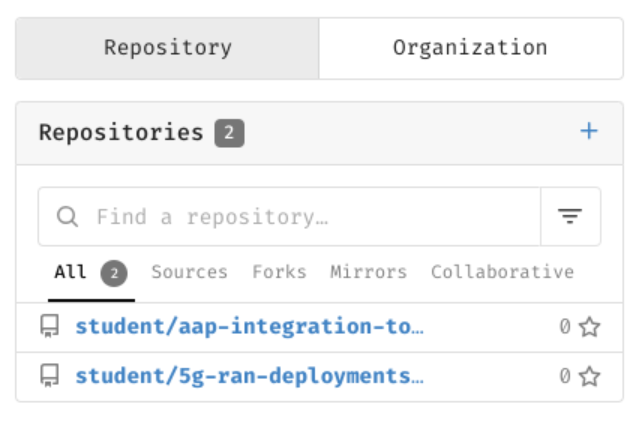
-
Click on the "+" next to
Repositories. -
Use
ztp-repositoryasRepository Nameand click onCreate Repository. -
You will get redirected to the new repository page.
Now that we have a repository ready to be used we will clone it to our workstation.
| Below commands must be executed from the workstation host if not specified otherwise. |
mkdir -p ~/5g-deployment-lab/
git clone http://student:student@infra.5g-deployment.lab:3000/student/ztp-repository.git ~/5g-deployment-lab/ztp-repository/
We’re ready to start working in the Git repository folder structure.
As we saw in a previous section, the Git repository we will be using will have the following structure:
├── site-configs
│   ├── hub-1
|   |   └── extra-manifest
|   |   └── reference-manifest
|   |   |   └── 4.16
│   ├── pre-reqs
│   │   └── sno2
│   └── resources
└── site-policies
    ├── fleet
    │   ├── active
    |   │   └── source-crs
    |   |   |   └── reference-crs
    |   |   |   └── custom-crs
    │   └── testing
    └── sites
        └── hub-1
Let’s replicate it:
If it is the first time that you are using git in your machine, a message requiring you to setup a Git Username and Email may be shown.
|
| The cluster name for the SNO that we will be deploying in the lab will be sno2, that’s why that folder exists in the repository structure that we are creating. |
cd ~/5g-deployment-lab/ztp-repository/
mkdir -p site-configs/{hub-1,resources,pre-reqs/sno2,hub-1/extra-manifest,reference-manifest/4.16}
mkdir -p site-policies/{fleet/active/source-crs/reference-crs,fleet/active/source-crs/custom-crs,fleet/testing,sites/hub-1}
touch site-configs/{hub-1,resources,pre-reqs/sno2,hub-1/extra-manifest,reference-manifest/4.16}/.gitkeep
touch site-policies/{fleet/active/source-crs/reference-crs,fleet/active/source-crs/custom-crs,fleet/testing,sites/hub-1}/.gitkeep
git add --all
git commit -m 'Initialized repo structure'
git push origin main
Bare Metal Node Details
The details for our baremetal node that we want to provision as SNO2 are the ones below:
-
RedFish Endpoint:
redfish-virtualmedia://192.168.125.1:9000/redfish/v1/Systems/local/sno2 -
MAC Address:
aa:aa:aa:aa:03:01 -
Primary disk:
/dev/vda -
BMC User:
admin -
BMC Password:
admin
Deployment Prerequisites
Before we start working on the SiteConfig, let’s add some information required for the deployment into the Git repository.
| In a production environment you don’t want to add sensitive information in plain text in your Git repository, for the sake of simplicity for this lab we are adding this information in plain text to the Git repo, so you don’t have to care about it. This applies to things like pull secrets or BMC credentials. |
-
BMC credentials file.
cat <<EOF > ~/5g-deployment-lab/ztp-repository/site-configs/pre-reqs/sno2/bmc-credentials.yaml --- apiVersion: v1 kind: Secret metadata: name: sno2-bmc-credentials namespace: sno2 data: username: "YWRtaW4=" password: "YWRtaW4=" type: Opaque EOF -
Pull secret for accessing the disconnected registry.
cat <<EOF > ~/5g-deployment-lab/ztp-repository/site-configs/pre-reqs/sno2/pull-secret.yaml --- apiVersion: v1 kind: Secret metadata: name: disconnected-registry-pull-secret namespace: sno2 stringData: .dockerconfigjson: '{"auths":{"infra.5g-deployment.lab:8443":{"auth":"YWRtaW46cjNkaDR0MSE="}}}' type: kubernetes.io/dockerconfigjson EOF -
Kustomization file for the SNO2 pre-reqs.
cat <<EOF > ~/5g-deployment-lab/ztp-repository/site-configs/pre-reqs/sno2/kustomization.yaml --- apiVersion: kustomize.config.k8s.io/v1beta1 kind: Kustomization resources: - bmc-credentials.yaml - pull-secret.yaml EOF -
Kustomization file for the clusters pre-reqs.
cat <<EOF > ~/5g-deployment-lab/ztp-repository/site-configs/pre-reqs/kustomization.yaml
---
apiVersion: kustomize.config.k8s.io/v1beta1
kind: Kustomization
resources:
  - sno2/
EOF
SiteConfig
Now that we have the pre-reqs, let’s jump into the SiteConfig.
Copy the command below and refer to the comments in the code for explanations.
cat << 'EOF' > ~/5g-deployment-lab/ztp-repository/site-configs/hub-1/5glab.yaml
---
apiVersion: ran.openshift.io/v1
kind: SiteConfig
metadata:
  name: "5glab"
  namespace: "5glab"
spec:
  # The base domain used by our SNOs
  baseDomain: "5g-deployment.lab"
  # The secret name of the secret containing the pull secret for our disconnected registry
  pullSecretRef:
    name: "disconnected-registry-pull-secret"
  # The OCP release we will be deploying otherwise specified (this can be configured per cluster as well)
  clusterImageSetNameRef: "active-ocp-version"
  # The ssh public key that will be injected into our SNOs authorized_keys
  sshPublicKey: "ssh-rsa AAAAB3NzaC1yc2EAAAADAQABAAACAQC5pFKFLOuxrd9Q/TRu9sRtwGg2PV+kl2MHzBIGUhCcR0LuBJk62XG9tQWPQYTQ3ZUBKb6pRTqPXg+cDu5FmcpTwAKzqgUb6ArnjECxLJzJvWieBJ7k45QzhlZPeiN2Omik5bo7uM/P1YIo5pTUdVk5wJjaMOb7Xkcmbjc7r22xY54cce2Wb7B1QDtLWJkq++eJHSX2GlEjfxSlEvQzTN7m2N5pmoZtaXpLKcbOqtuSQSVKC4XPgb57hgEs/ZZy/LbGGHZyLAW5Tqfk1JCTFGm6Q+oOd3wAOF1SdUxM7frdrN3UOB12u/E6YuAx3fDvoNZvcrCYEpjkfrsjU91oz78aETZV43hOK9NWCOhdX5djA7G35/EMn1ifanVoHG34GwNuzMdkb7KdYQUztvsXIC792E2XzWfginFZha6kORngokZ2DwrzFj3wgvmVyNXyEOqhwi6LmlsYdKxEvUtiYhdISvh2Y9GPrFcJ5DanXe7NVAKXe5CyERjBnxWktqAPBzXJa36FKIlkeVF5G+NWgufC6ZWkDCD98VZDiPP9sSgqZF8bSR4l4/vxxAW4knKIZv11VX77Sa1qZOR9Ml12t5pNGT7wDlSOiDqr5EWsEexga/2s/t9itvfzhcWKt+k66jd8tdws2dw6+8JYJeiBbU63HBjxCX+vCVZASrNBjiXhFw=="
  clusters:
  - clusterName: "sno2"
    # The sdn plugin that will be used
    networkType: "OVNKubernetes"
    # All Composable capabilities removed except required for telco
    installConfigOverrides:  "{\"capabilities\":{\"baselineCapabilitySet\": \"None\", \"additionalEnabledCapabilities\": [ \"OperatorLifecycleManager\", \"NodeTuning\", \"Ingress\" ] }}"
    #extraManifestPath: hub-1/extra-manifest
    # Search for extra configuration in the following folders
    extraManifests:
      searchPaths:
        - hub-1/extra-manifest/
        - reference-manifest/4.16/
    # Cluster labels (this will be used by RHACM)
    clusterLabels:
      common: "ocp416"
      logicalGroup: "active"
      group-du-sno: ""
      du-site: "sno2"
      du-zone: "europe"
      hardware-type: "hw-type-platform-1"
    # Pod's SDN network range
    clusterNetwork:
      - cidr: "10.128.0.0/14"
        hostPrefix: 23
    # Network range where the SNO is connected
    machineNetwork:
      - cidr: "192.168.125.0/24"
    # Services SDN network range
    serviceNetwork:
      - "172.30.0.0/16"
    # Sets up a cluster for CPU partitioning at install time
    cpuPartitioningMode: AllNodes
    additionalNTPSources:
      - infra.5g-deployment.lab
    holdInstallation: false
    nodes:
      - hostName: "sno2.5g-deployment.lab"
        role: "master"
        # We can add custom labels to our nodes, these will be added once the node joins the cluster
        nodeLabels:
          5gran.lab/my-custom-label: ""
        bmcAddress: "redfish-virtualmedia://192.168.125.1:9000/redfish/v1/Systems/local/sno2"
        # The secret name of the secret containing the bmc credentials for our bare metal node
        bmcCredentialsName:
          name: "sno2-bmc-credentials"
        # The MAC Address of the NIC from the bare metal node connected to the machineNetwork
        bootMACAddress: "AA:AA:AA:AA:03:01"
        bootMode: "UEFI"
        rootDeviceHints:
          deviceName: /dev/vda
        # Creates a 5th partition on the root disk to use it as /var/lib/containers mountpoint
        ignitionConfigOverride: '{"ignition":{"version":"3.2.0"},"storage":{"disks":[{"device":"/dev/vda","partitions":[{"label":"var-lib-containers","sizeMiB":0,"startMiB":100000}],"wipeTable":false}],"filesystems":[{"device":"/dev/disk/by-partlabel/var-lib-containers","format":"xfs","mountOptions":["defaults","prjquota"],"path":"/var/lib/containers","wipeFilesystem":true}]},"systemd":{"units":[{"contents":"# Generated by Butane\n[Unit]\nRequires=systemd-fsck@dev-disk-by\\x2dpartlabel-var\\x2dlib\\x2dcontainers.service\nAfter=systemd-fsck@dev-disk-by\\x2dpartlabel-var\\x2dlib\\x2dcontainers.service\n\n[Mount]\nWhere=/var/lib/containers\nWhat=/dev/disk/by-partlabel/var-lib-containers\nType=xfs\nOptions=defaults,prjquota\n\n[Install]\nRequiredBy=local-fs.target","enabled":true,"name":"var-lib-containers.mount"}]}}'
        nodeNetwork:
          interfaces:
            - name: enp1s0
              macAddress: "AA:AA:AA:AA:03:01"
          config:
            interfaces:
              - name: enp1s0
                type: ethernet
                state: up
                ipv4:
                  enabled: true
                  dhcp: true
                ipv6:
                  enabled: false
EOF
As of version 4.14 extraManifestPath is subject to a deprecation warning. While extraManifestPath is still supported, we recommend that you use extraManifests.searchPaths. It is strongly recommended that you extract the contents of /extra-manifest from the ztp-site-generate container and push it to the Git repository. Notice that the subdirectory names /hub-1/extra-manifest and reference-manifest/ used throughout are example names only.
|
In our site, we defined clusterImageSetNameRef: "active-ocp-version" as for the release to use to deploy our site. This reference will point to the active release we are deploying our sites with. Let’s create the ClusterImageSet in the repo:
cat <<EOF > ~/5g-deployment-lab/ztp-repository/site-configs/resources/active-ocp-version.yaml
---
apiVersion: hive.openshift.io/v1
kind: ClusterImageSet
metadata:
  name: active-ocp-version
spec:
  releaseImage: infra.5g-deployment.lab:8443/openshift/release-images:4.16.0-x86_64
EOF
Reference Manifest Configuration
Let’s add the reference RAN configuration for the version of OCP we are about to deploy. In the workstation, run the following command to extract the reference ZTP 4.16 RAN configuration. Notice that reference-manifest/4.16/ refers to the Git subdirectory that stores the contents of the RAN configuration for a specific version . This configuration is applied during installation. Those manifests are extracted from the /extra-manifest folder of the ztp-site-generate container.
If you get ERRO[0000] running `/usr/bin/newuidmap 51706 0 1000 1 1 100000 65536: newuidmap: write to uid_map failed: Operation not permitted` when running podman commands, run them with sudo.
|
podman login infra.5g-deployment.lab:8443 -u admin -p r3dh4t1! --tls-verify=false
podman run --log-driver=none --rm --tls-verify=false infra.5g-deployment.lab:8443/openshift4/ztp-site-generate-rhel8:v4.16.1-5 extract /home/ztp/extra-manifest --tar | tar x -C ~/5g-deployment-lab/ztp-repository/site-configs/reference-manifest/4.16/
Our recommendation is to always create a reference and keep the reference and user defined manifests (see next section) separately. This makes later updates to the reference based on z-stream releases significantly easier (simply replace the contents of reference-manifests with updated content)
Extra Manifest Configuration
Now, let’s add the extra or custom RAN configuration to the cluster. It is strongly recommended to include crun manifests as part of the additional install-time manifests for 4.13+. So let’s create proper machine configuration in the extra manifest folder:
cat <<EOF > ~/5g-deployment-lab/ztp-repository/site-configs/hub-1/extra-manifest/enable-crun-master.yaml
---
apiVersion: machineconfiguration.openshift.io/v1
kind: ContainerRuntimeConfig
metadata:
 name: enable-crun-master
spec:
 machineConfigPoolSelector:
   matchLabels:
     pools.operator.machineconfiguration.openshift.io/master: ""
 containerRuntimeConfig:
   defaultRuntime: crun
EOF
cat <<EOF > ~/5g-deployment-lab/ztp-repository/site-configs/hub-1/extra-manifest/enable-crun-worker.yaml
---
apiVersion: machineconfiguration.openshift.io/v1
kind: ContainerRuntimeConfig
metadata:
name: enable-crun-worker
spec:
machineConfigPoolSelector:
matchLabels:
pools.operator.machineconfiguration.openshift.io/worker: ""
containerRuntimeConfig:
defaultRuntime: crun
EOF
As of version 4.16 the default cgroups configuration is cgroupsv2. If there is a need to run cgroupsv1 instead, please add the enable-cgroups-v1.yaml extra-manifest to the same extra-manifest folder where crun is configured.
|
Preparing for the Installation
Finally, we will add the kustomizations for the SiteConfigs, we only have one site, but we will leave the repo ready to consume more than one.
cat <<EOF > ~/5g-deployment-lab/ztp-repository/site-configs/hub-1/kustomization.yaml
---
apiVersion: kustomize.config.k8s.io/v1beta1
kind: Kustomization
generators:
  - 5glab.yaml
EOF
cat <<EOF > ~/5g-deployment-lab/ztp-repository/site-configs/resources/kustomization.yaml
---
apiVersion: kustomize.config.k8s.io/v1beta1
kind: Kustomization
resources:
  - active-ocp-version.yaml
EOF
cat <<EOF > ~/5g-deployment-lab/ztp-repository/site-configs/kustomization.yaml
---
apiVersion: kustomize.config.k8s.io/v1beta1
kind: Kustomization
resources:
  - pre-reqs/
  - resources/
generators:
  - hub-1/5glab.yaml
EOF
At this point we can push the changes to the repo and continue to the next section.
cd ~/5g-deployment-lab/ztp-repository
git add --all
git commit -m 'Added SNO2 and 5GLab Site information'
git push origin main
cd ~