CNF Upgrade Preparation
The life of a POD is an important topic to understand. This section will describe several topics that are important to keeping your CNF PODs healthy and allow the cluster to properly schedule them during an upgrade.
Life of a POD
Why is this important?
Pods don’t move or reboot. Pods are deleted and a new pod takes its place.
There isn’t (or shouldn’t be) a single pod with it’s own set of specifications but instead it should have lots of other pods that are the exact same in a group, called a deployment. A deployment should spread the workload across all of the pods.
This is specified because we need to move away from the idea that each and every single pod needs to be cared for like it is that only strand holding things together. The old saying goes, a rope is made up of many strands, which is what makes it stronger than any single strand.
CNF Requirements Document
Before you go any further, please read through the CNF requirements document. In this section a few of the most important points will be discussed but the CNF Requirements Document has additional detail and other important topics.
POD Disruption Budget
Each set of PODs in a deployment can be given a specific minimum number of PODs that should be running in order to keep from disrupting the functionality of the CNF, thus called the POD disruption budget (PDB). However, this budget can be improperly configured.
For example, if you have 4 PODs in a deployment and your PDB is set to 4, this means that you are telling the scheduler that you NEED 4 PODs running at all times. Therefore, in this scenario ZERO PODs can come down.

To fix this, the PDB can be set to 2, letting 2 of the 4 PODs to be scheduled as down and this would then let the worker nodes where those PODs are located be rebooted.
This does NOT mean that your deployment will be running on only 2 pods for a period of time. This means that 2 new pods can be created to replace 2 current pods and there can be a short period of time as the new pods come online and the old pods are deleted.
POD Anti-affinity
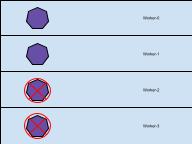
True high availability requires a duplication of a process to be running on separate hardware, thus making sure that an application will continue to run if one piece of hardware goes down. OpenShift can easily make that happen since processes are automatically duplicated in separate PODs within a deployment. However, those PODs need to have anti-affinity set on them so that they are NOT running on the same hardware.
During an upgrade anti-affinity is important so that there aren’t too many pods on a node when it is time for it to reboot. For example: if there are 4 pods from a single deployment on a node, and the PDB is set to only allow 1 pod be deleted at a time, then it will take 4 times a long for that node to reboot because it will be waiting on all 4 pods to be deleted.
Liveness / Readiness / Startup Probes
OpenShift and Kubernetes have some built in features that not everyone takes advantage of called liveness, readiness and startup probes. These are very important when POD deployments are dependent upon keeping state for their application. This document won’t go into detail regarding these probes but please review the OpenShift documentation on how to implement their use.